
TECHNICAL BRIEF
Why mobile websites feel slow before the first tap
Mobile pages often feel slow because too much JavaScript runs before the user can interact, not because images are large.
The short version
If a mobile website feels slow, it's usually not because images are too big.
It's because the browser is busy running too much code before it's ready to respond to you.
So even though the page looks loaded, it's not actually ready to be used yet.
What this feels like as a shopper
You open a site on your phone.
You see the hero image
You see text
The layout looks done
But when you try to:
- Tap the menu
- Scroll
- Click a product
There's a pause.
Nothing happens right away.
That moment, even if it's just a few seconds, is where people think:
"This site feels slow."
Not broken.
Just... heavy.
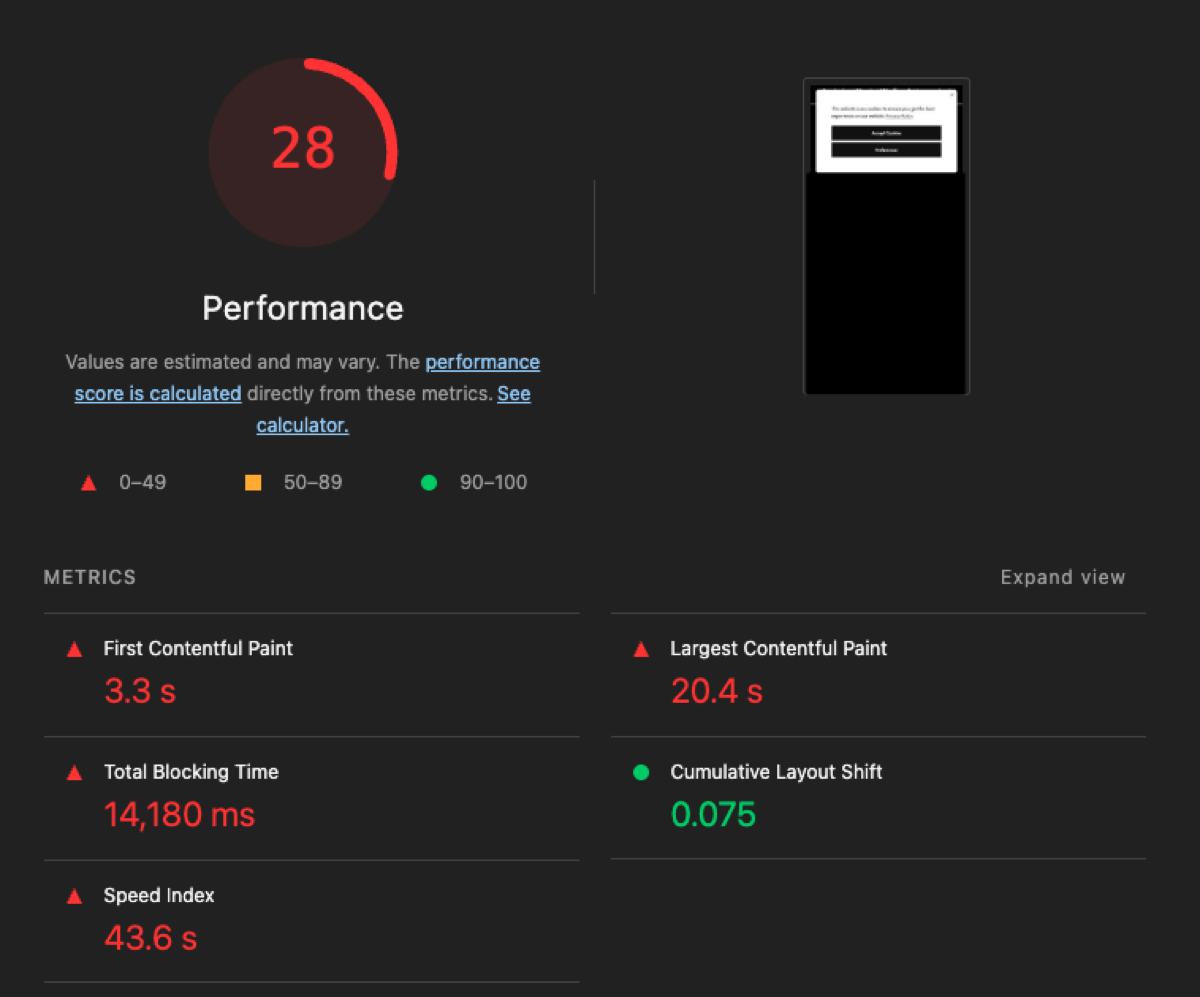
This screenshot shows the core issue clearly:
- The page scores poorly on mobile performance
- The main content takes a long time to fully settle
- Most importantly, the browser is blocked for over 10 seconds
This tells us something important:
The phone isn't struggling to download content, it's struggling to process it.
What's actually happening behind the scenes (plain English)
Your phone can only focus on one thing at a time.
Before it can react to your tap, it has to finish:
- Running scripts
- Loading tools
- Setting up tracking
- Initializing widgets
- Adjusting layout as new elements appear
If too much of that happens at once, your tap has to wait its turn.
That's why the page feels unresponsive before the first interaction.
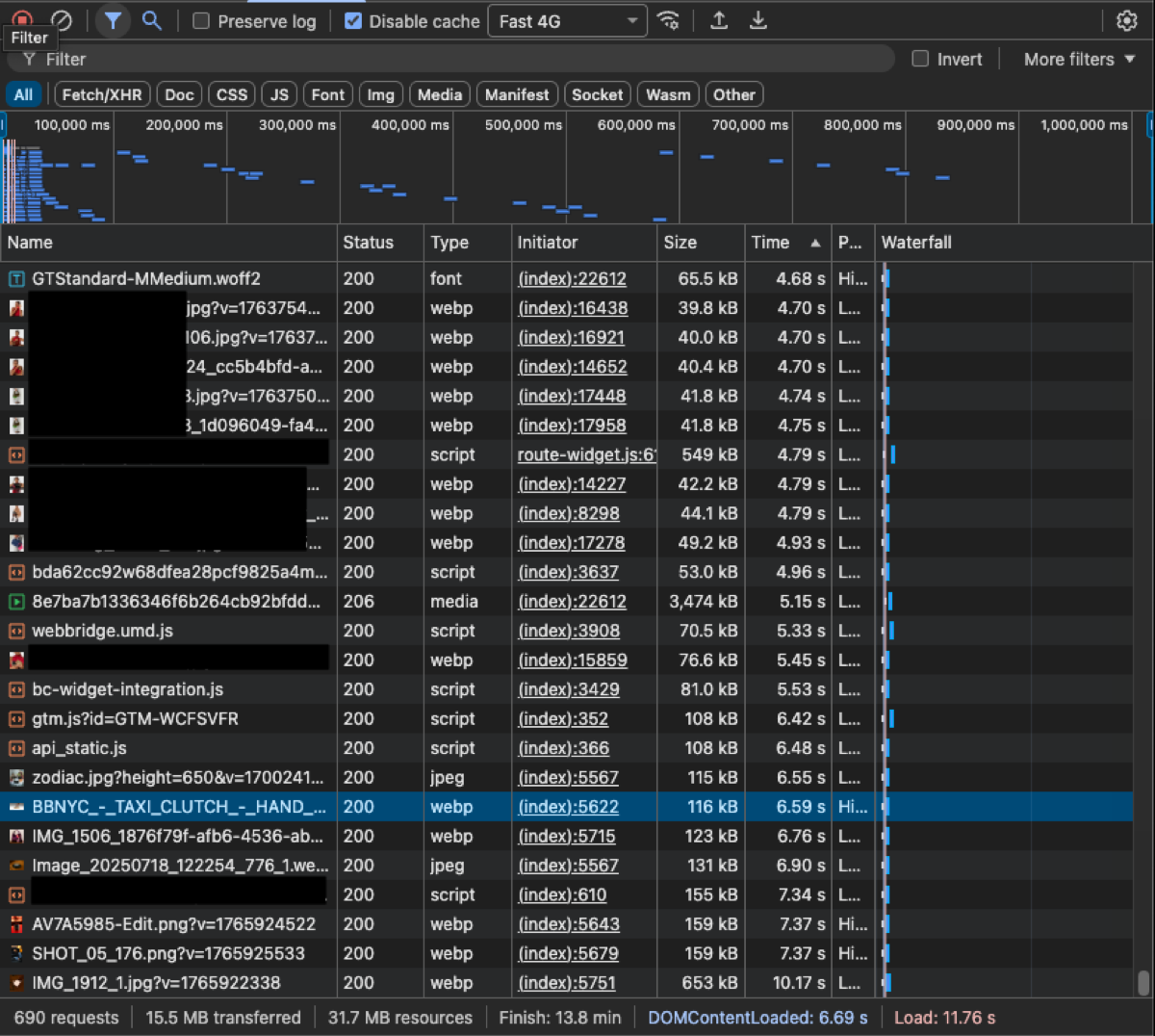
This view shows what loads in the first few seconds.
You'll notice:
- A long list of JavaScript files
- Many tools loading at the same time
- Images loading alongside scripts instead of being prioritized
Nothing here is "wrong" on its own.
The issue is everything competing at once.
The browser can't prioritize what the user actually wants to do yet.
The real bottleneck: too much JavaScript too early
JavaScript is what makes modern sites interactive. Menus, carts, animations, tracking, personalization, etc.
But on mobile, timing matters.
If too much JavaScript runs before interaction:
- The browser gets busy
- Input gets delayed
- The page feels frozen even though it's visible
This delay is what people experience as "slowness."
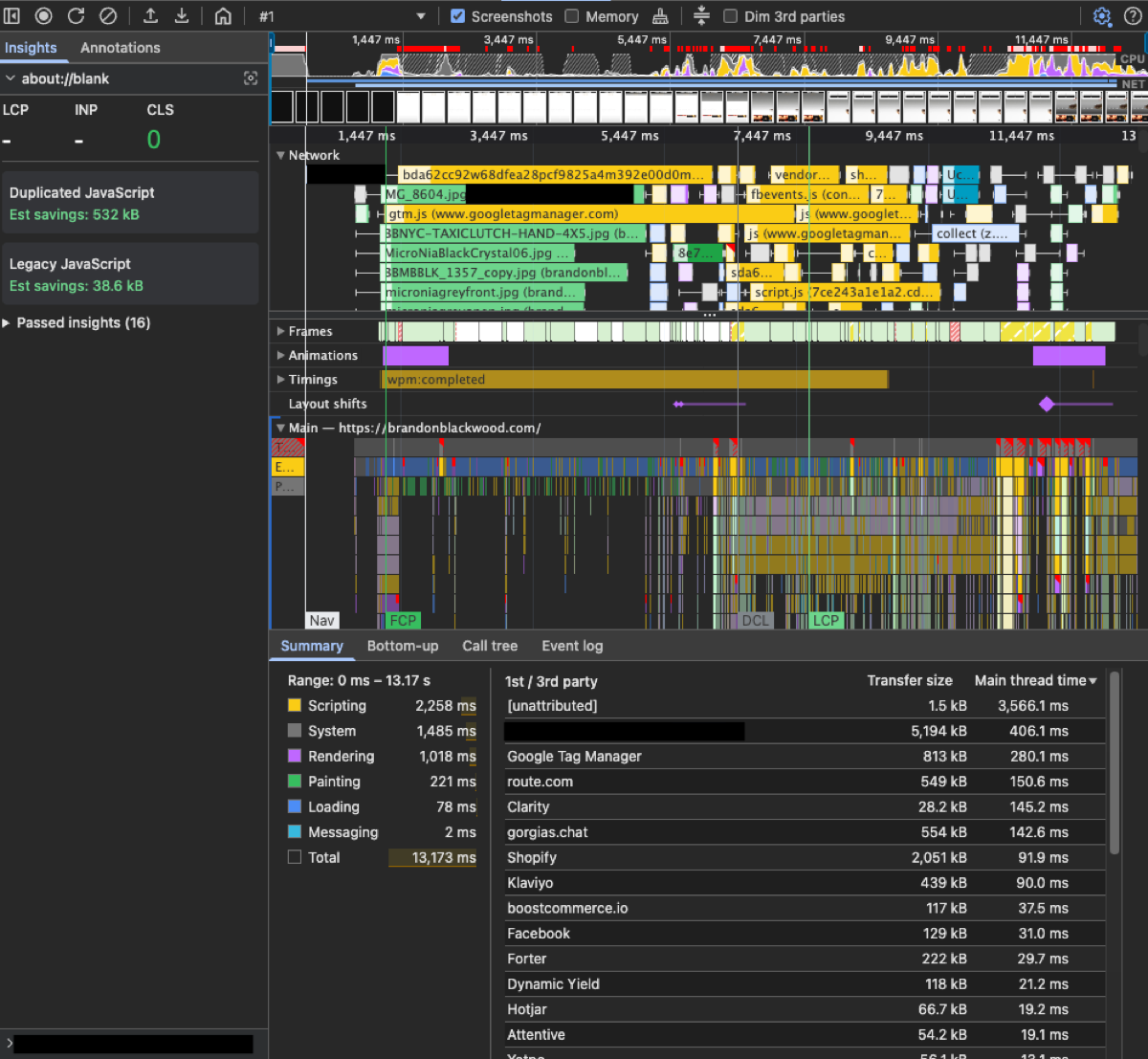
This timeline shows the browser's "workload."
What stands out:
- Long blocks of activity early on
- The browser doing constant work before interaction
- Very little idle time at the start
During this window, taps and scrolls are essentially put on hold.
"But aren't images the problem?"
Images do matter, but they're not the main issue here.
In this case:
- The hero image isn't unusually large
- It's already optimized
- It's not the slowest thing on the page
The reason it still appears late is because:
- Scripts are running first
- Fonts are loading and adjusting layout
- The browser is busy setting everything else up
So the image waits, even though it's ready.
That's why image optimization alone doesn't fix the feeling of slowness.
Why this is worse on mobile than desktop
Desktop computers are forgiving.
Phones are not.
On mobile:
- CPUs are slower
- Connections are less stable
- Users expect instant feedback
A few seconds of unresponsiveness on mobile feels much worse than it does on desktop.
That's why this problem shows up most clearly on phones, and why it affects conversion.
The important takeaway
Mobile storefronts don't feel slow because they're downloading too much.
They feel slow because they're doing too much before the user can interact.
When the browser is busy, the user waits.
And users don't like waiting.
How this is usually fixed
This isn't about removing tools or stripping features.
It's about when things run.
Common improvements include:
- Letting visible content load first
- Delaying non-essential tools until after interaction
- Prioritizing the first screen over background logic
- Preventing layout shifts as content loads
- Reducing how much code runs before the first tap
The goal is simple:
Make the site feel responsive as soon as it appears.
Why this keeps happening
Modern storefronts add tools over time:
- Analytics
- Marketing
- Experiments
- Personalization
- Widgets
Each one makes sense on its own.
But together, they quietly slow down the moment that matters most, the first interaction.
Nothing breaks.
Nothing crashes.
The site just starts to feel heavier than it should.
Final thought
If a shopper's first tap feels delayed, they don't blame JavaScript.
They blame the site.
That's why this moment matters.
About this brief
This analysis is based on real mobile Lighthouse audits, network waterfalls, and performance traces, summarized from the accompanying technical report. Screenshots are anonymized and represent common patterns seen across modern, high-traffic storefronts.