
TECHNICAL BRIEF
Why mobile issues don't show up on desktop
Desktop performance tells you if the site works. Mobile performance tells you how it feels.
The most misleading sentence in e-commerce
"It feels fine on my computer."
That sentence has delayed more performance fixes than almost anything else.
Because it's usually true, on desktop.
And that's exactly the problem.
What people mean when they say "it feels fine"
When someone tests a site on their laptop, they're usually:
- On fast Wi-Fi
- Using a powerful CPU
- Sitting close to the screen
- Interacting with a mouse, not a thumb
In that environment, almost any modern storefront feels okay.
Pages load fast enough.
Menus open quickly.
Nothing feels obviously broken.
So the assumption becomes:
"Performance isn't the issue."
Why desktop is forgiving (mobile is not)
Desktop computers are built to hide inefficiencies.
They have:
- Strong processors
- Stable network connections
- Plenty of memory
- A lot of performance headroom
That extra power acts like a buffer.
It smooths over:
- Heavy scripts
- Extra tools
- Poor execution order
- Layout reflows
- Background work
The site may not be efficient,
but the machine can handle it.
Mobile removes the safety net
Phones don't have that buffer.
On mobile:
- CPUs are slower
- Networks fluctuate constantly
- Memory is limited
- Everything competes for attention
So the same work that feels invisible on desktop becomes obvious on a phone.
That's when people say:
"It feels slow on mobile."
They're not imagining it.
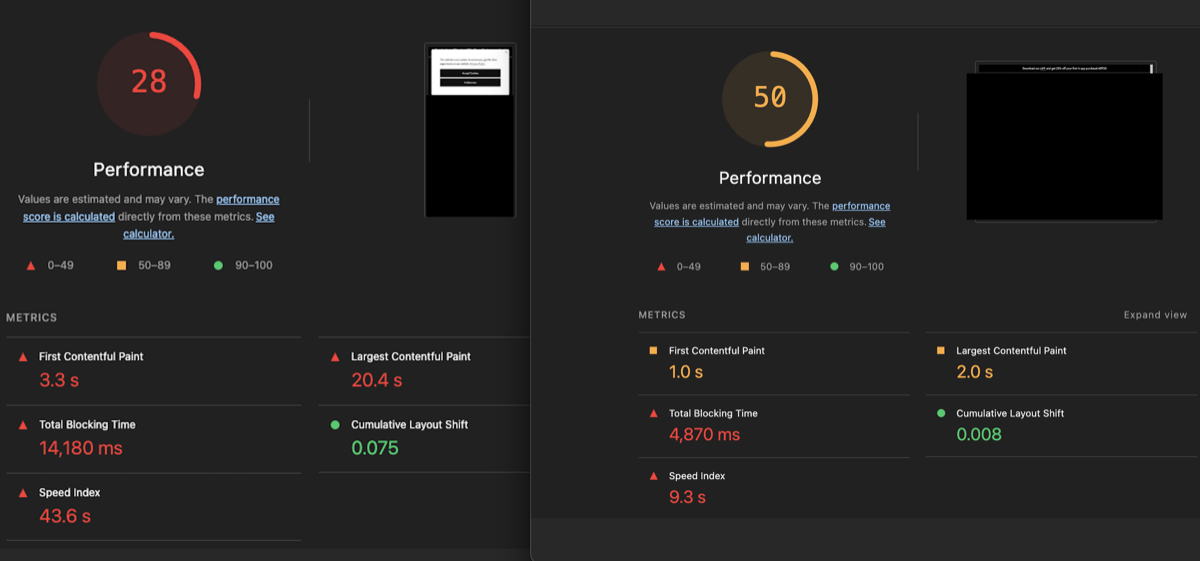
This contrast usually shows:
- Desktop scores looking "fine"
- Mobile scores revealing long blocking time
- Interaction delays appearing only on mobile
It visually reinforces a simple truth:
Desktop hides problems. Mobile exposes them.
The interaction gap no one tests for
Most teams test one thing:
"Does the page load?"
But users care about something else:
"Can I use it?"
On mobile, there's often a gap between:
- When the page looks ready
- And when it's ready to interact
Desktop machines shorten that gap.
Mobile devices make it obvious.
That gap is where:
- Taps don't register
- Scrolls lag
- Menus hesitate
And that's where users get frustrated.
Why this catches teams off guard
Because nothing changed.
No redesign.
No big deploy.
No obvious bug.
The site works.
Desktop tests pass.
QA signs off.
But mobile conversion slowly drops.
This happens because:
- Tools accumulate over time
- Scripts run earlier than they used to
- Execution order drifts
- The browser does more work before interaction
Desktop absorbs the cost.
Mobile makes the user pay for it.
The thumb test (the real benchmark)
There's a simple test most teams don't run:
Open the site on your phone.
Try to tap immediately.
Not after five seconds.
Not after scrolling.
Immediately.
If anything hesitates, that's the problem.
Desktop rarely fails this test.
Mobile fails it often.
Why paid and social traffic feel this more
Mobile traffic is impatient by default.
It comes from:
- Social feeds
- Ads
- Links shared in messages
- Fast, impulsive decisions
Users aren't settling in.
They're deciding quickly.
So when interaction is delayed:
- Confidence drops
- Bounce increases
- The site feels heavier than the brand deserves
Even if nothing "looks" wrong.
The key takeaway
Desktop performance tells you if the site works.
Mobile performance tells you how it feels.
And how it feels decides whether someone stays.
What this usually means in practice
When mobile issues don't show up on desktop, it's a signal. Not a mystery.
It usually means:
- Too much is happening before interaction
- JavaScript runs earlier than it should
- The browser is busy when the user is ready
- The experience is technically "loaded" but practically unavailable
This is common.
It's fixable.
And it's easy to miss if you only test on desktop.
Final thought
Desktop answers the question:
"Does the site load?"
Mobile answers the question:
"Would I trust this enough to keep going?"
That difference matters more than most teams realize.
About this brief
This analysis is based on mobile Lighthouse audits and performance traces across modern, high-traffic storefronts. Screenshots, where included, are anonymized and represent recurring patterns seen during real-world audits.